The Complete Guide to Understanding What an eSIM Card Actually Is
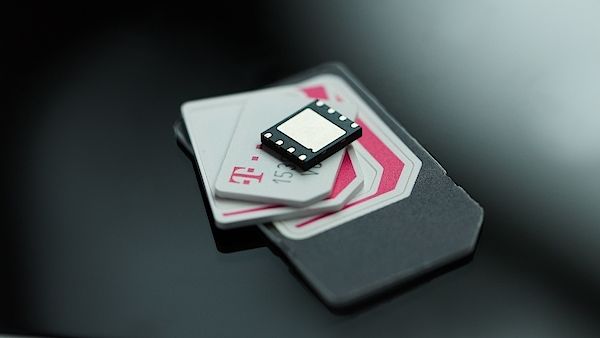
An eSIM card is a tiny, embedded chip inside your device that replaces the need for a physical plastic SIM. It works by allowing you to download a cellular plan directly onto your phone, which you can activate instantly with a simple QR code scan. The biggest value is how easy it makes switching carriers—you can store multiple plans and swap between them without ever fumbling for a tiny card.
What Exactly Is an eSIM and How Does It Work?
An eSIM, or embedded SIM, is a tiny chip permanently soldered inside your device that functions identically to a physical SIM card. Instead of inserting a plastic card, you download a digital profile from your carrier. To activate it, you scan a QR code or install a carrier app, which writes the encrypted subscriber data—like your phone number and network authentication keys—directly onto the chip. This allows you to switch between multiple carrier profiles without swapping cards. Q: How does an eSIM enable dual SIM functionality? A: Some phones allow one physical SIM and one eSIM simultaneously, letting you maintain two active lines on a single device.
Understanding the Embedded SIM vs. Traditional Plastic Cards
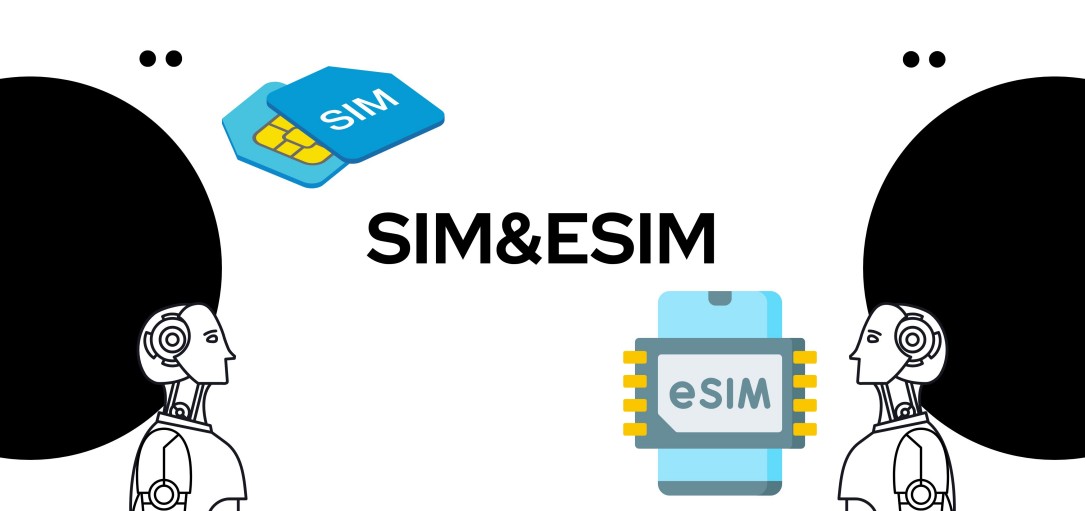
Understanding the embedded SIM vs. traditional plastic cards centers on physical form and flexibility. A traditional SIM is a removable, plastic chip that ties you to one carrier unless physically swapped. In contrast, an eSIM is a soldered chip inside your device; you cannot remove it. This enables remote profile switching without handling a tiny card. Remote provisioning allows instant activation of a new plan by scanning a QR code, eliminating wait times for a physical delivery. Traditional cards require a tray and manual insertion, while the eSIM frees that space for other hardware, like a larger battery or additional sensors.
| Aspect | Embedded SIM (eSIM) | Traditional Plastic Card |
|---|---|---|
| Physical Form | Soldered chip, non-removable | Removable plastic, various sizes |
| Carrier Change | Remote download of new profile | Requires physical swap of card |
| Activation | QR code or app, instant | Card insertion & manual setup |
| Device Space | Saves internal space | Requires dedicated tray |
The Technology Behind Remote SIM Provisioning
Remote SIM provisioning relies on a dedicated applet within the eSIM’s secure element, which stores a unique eSIM activation code. When a user scans a QR code or downloads a carrier profile, the applet establishes a secure HTTPS connection to the carrier’s Subscription Manager Data Preparation (SM-DP+) server. This server encrypts the network credentials and sends them as bound profile packages. The eSIM’s local processor then decrypts and installs the profile, overwriting the old one in a dedicated memory partition, effectively swapping network access without physical hardware.
Compatible Devices and Operating Systems Overview
eSIM-compatible devices span most modern smartphones from Apple, Google, and Samsung, alongside select tablets, smartwatches, and laptops. iOS 12.1 or later supports eSIM activation on iPhone XS and newer models, while Android 10 onward enables it on devices like the Pixel 3 and Galaxy S20 series. Laptops such as the Surface Pro 7+ and Lenovo ThinkPad X1 Carbon also include embedded eSIM trays for cellular data. Always check your specific model’s settings menu for an “Add Cellular Plan” option—this confirms native eSIM support without a physical card slot.
Key Advantages of Switching to Digital SIM Technology
Switching to an eSIM card unlocks the ability to instantly activate a new data plan without waiting for a physical SIM to arrive, making travel and carrier changes seamless. You can store multiple profiles on one device, switching between work and personal lines or local and home numbers with a simple software toggle. This eliminates the hassle of fumbling with tiny nano-SIMs or worrying about losing a card. The core advantage is unmatched convenience—you gain freedom from physical hardware theft or damage. Q: What is the biggest practical benefit? A: Instant remote provision of a cellular plan, directly from your phone’s settings, without visiting a store or inserting any plastic chip.
Eliminating Physical SIM Trays and Enhancing Durability
The removal of the physical SIM tray directly enhances device durability by eliminating a common ingress point for water and dust, contributing to higher IP ratings. This structural simplification also removes a thin, breakable component, reducing the risk of internal damage from drops or pressure. An unsealed chassis can then be engineered with fewer weak points, improving overall structural rigidity. Furthermore, this design shift frees internal space, allowing for larger batteries or reinforced frames, which directly improves physical resilience without sacrificing connectivity or functionality.
Seamless Network Switching Without Swapping Cards
Seamless network switching is a core advantage of an eSIM card, eliminating physical card swaps entirely. Users simply select a new carrier profile from their device’s settings to change networks instantly. The process follows a clear sequence: first, download a new eSIM profile from a supported provider; second, activate it directly through the device menu; third, manage multiple active profiles without removing or inserting anything. The eSIM retains all profiles, allowing instant toggling between them based on coverage or cost. This avoids downtime from waiting for a physical SIM delivery or handling tiny cards during travel.
Dual SIM Functionality for Work and Personal Lines
With an eSIM, juggling work and personal lines becomes seamless. You maintain a single device while keeping professional calls and business apps entirely separate from your private number and messages. This instant profile switching eliminates the need to carry a second phone or swap physical SIM cards. You can set different ringtones for each line or deactivate the work profile after hours to protect your personal time.
- Assign separate voicemail greetings and data plans for work versus personal use.
- Receive calls on both numbers simultaneously without network dropouts.
- Keep work contacts and corporate apps isolated in one dedicated eSIM profile.
How to Activate and Manage Your First eSIM Profile
First, grab a QR code or activation details from your carrier. On your phone, head to Settings > Mobile Data, then tap “Add eSIM” and scan the code. Follow the prompts—your profile will download instantly. Once live, manage it by labeling profiles (e.g., “Work” or “Travel”) and toggling lines on or off for calls and data. Need to delete it? Just tap “Remove eSIM” under the profile. Quick Q&A: Q: Can I switch eSIMs without a physical SIM? A: Yes, just swap the active profile in settings—no cards needed. That’s it: scan, label, toggle, done.

Getting a QR Code or Activation Code from Carriers
When you buy an eSIM plan, carriers typically send your eSIM activation QR code via email or give you a manual code in your account dashboard. To get started, you’ll usually complete checkout on their website or app, then check your inbox for a message titled “Your eSIM details.” Inside, you’ll find a QR code image and sometimes a numeric activation code (SM-DP+ address) as a backup. Here’s the typical flow:
- Purchase the plan and choose a data or talk package.
- Receive the QR code or activation code via email or within the carrier’s app.
- Save that code instantly—don’t close the browser until you’ve scanned it on your phone.
Step-by-Step Setup on iOS, Android, and Windows
To get started, open your phone’s Settings app. On iOS, tap “Cellular” then “Add eSIM”—you can scan a QR code from your carrier or enter details manually. For Android, go to “Network & Internet” > “SIMs” > “Add eSIM” and follow the same QR or manual prompt. On Windows, head to “Settings” > “Network & Internet” > “Cellular” and choose “Add eSIM.” After scanning, the profile should activate within minutes. If prompted, set it as your primary data line or keep it alongside your physical SIM.
Whether you’re using iOS, Android, or Windows, activating your first eSIM is a quick process—just scan a QR code, confirm the profile, and you’re online.
Storing Multiple Profiles and Switching Between Them
One of the biggest perks of an eSIM is storing multiple profiles and switching between them without fumbling with physical cards. Your device holds several eSIMs, so you can keep your home number active while adding a local data plan for travel. Switching is simple:
- Open your phone’s cellular settings.
- Tap the eSIM profile you want to use, then toggle it on.
- Turn off the profile you’re not using to avoid double charges.
You can label each profile (like “Work” or “Travel”) to avoid confusion. Just remember, only one profile can be active for calls and texts at a time, but you can enable data roaming on a second line simultaneously.
Travel Use Cases: Roaming Without the Hassle
Travel Use Cases: Roaming Without the Hassle with an eSIM card eliminate the need for physical SIM swaps or expensive roaming plans. Before departure, you can purchase and activate a local data plan from your device, ensuring instant connectivity upon arrival. This avoids hunting for local SIMs or dealing with carrier contracts. For multi-country trips, install multiple eSIM profiles and switch between them in settings without changing cards.
A single eSIM profile can provide seamless data access across a region, removing the stress of managing separate SIMs for each border crossing.
You retain your home number for calls and texts, while using the eSIM exclusively for data, simplifying travel communication.
Instant Local Connectivity When Visiting Overseas
Landing abroad no longer means hunting for airport Wi-Fi or swapping out your physical SIM. With an eSIM, you get instant local network access the second your plane lands. Just scan a QR code or install a profile before you leave, and you’re connected to a local provider upon arrival—no waiting in line at a kiosk. Your phone automatically selects the strongest signal, letting you call an Uber or message family immediately.
Q: How do I activate a local eSIM the moment I step off the plane?
A: Simply turn on your phone’s data roaming for that eSIM profile. Since you downloaded it beforehand, your phone will latch onto a local tower in seconds, no manual setup needed.
Comparing International Plans and Data-Only Options
When comparing eSIM options for travel, international plans bundle voice, SMS, and data, often at a higher per-GB cost but with a local number. Data-only plans are for users reliant on messaging apps and VoIP; they offer cheaper rates and higher data caps per dollar. The key differentiator is whether you need a local number for bookings or emergency contacts, or if pure connectivity suffices. Data-only eSIMs are typically purchased per country or region, while international plans may cover multiple zones seamlessly.
| Feature | International Plans | Data-Only Options |
|---|---|---|
| Voice/SMS | Included (often limited) | Not included |
| Cost per GB | Higher | Lower |
| Local Number | Yes | No |
| Best for | Business travelers, local calls | Streaming, map-heavy users |
Avoiding Expensive Roaming Fees with Prepaid Profiles
A primary benefit of eSIM technology is avoiding expensive roaming fees with prepaid profiles. Instead of relying on your home carrier’s daily pass, you purchase a local or regional data plan before departure. These prepaid profiles connect you to in-country networks at local rates, eliminating surprise bills. Installation is done via a QR code or app, activating instantly. This strategy allows you to allocate a fixed budget for data, with no contract or hidden charges, ensuring you pay only for what you use while traveling.
Prepaid eSIM profiles sidestep roaming fees by providing local network access at a fixed, upfront cost.
Security and Privacy Considerations for Digital Identities
An eSIM digitizes your identity profile, creating a new attack surface through remote provisioning. Unlike a physical SIM, your digital identity can be compromised without physical access if the activation code (QR code or SM-DP+ address) is intercepted via phishing or unsecured networks. Key advice: treat the eSIM activation link like a password—never store it in plain text or share it. Q: How does eSIM prevent cloning of my digital identity? A: It uses hardware-backed secure elements with cryptographic keys that never leave the device, making remote extraction of your IMSI or authentication credentials computationally infeasible compared to a cloned plastic SIM. Always enforce device-level PINs and disable remote provisioning via the carrier portal when not actively switching profiles to prevent unauthorized identity modifications.
Encryption and Remote Wipe Capabilities
eSIM security relies on encryption standards, such as AES-256, which protect the digital profile and authentication keys stored on the embedded chip, ensuring that transmitted identity data remains inaccessible to unauthorized parties. A critical user safeguard is remote wipe capabilities, allowing the eSIM profile to be securely erased from a device if it is lost or stolen. This deactivation instantly severs network access, preventing misuse of the digital identity without requiring physical SIM removal. Users can typically trigger this wipe through a carrier’s portal or device management system, providing a direct, practical measure against identity theft and unauthorized account activity.
Risks of Profile Theft and How Carriers Mitigate Them
Profile theft poses a critical risk, as a cloned eSIM profile lets attackers impersonate you, intercepting calls and SMS-based two-factor codes. Carriers mitigate this with secure remote provisioning, encrypting the profile during download and binding it to your phone’s hardware via the eUICC chip. They also employ mutual authentication between the device and the carrier’s server, preventing spoofing.
- Real-time cryptographic verification ensures only authorized devices can activate a profile.
- If theft is reported, carriers instantly deactivate and push a new profile to a fresh device.
- Tamper-resistant storage in the eSIM chip guards against physical extraction of credentials.
What Happens When You Lose a Device with an Active Profile
Losing a device with an active eSIM profile triggers an immediate security risk, as the digital identity remains accessible via the lost hardware. Your first step is contacting your carrier to remotely suspend the eSIM profile, which deactivates network authentication and prevents unauthorized usage. Simultaneously, you must rely on your device’s account credentials (e.g., iCloud or Google account) to remotely wipe the eSIM data. Once suspended, the profile cannot be reactivated on the lost device; instead, your carrier issues a new QR code or activation code to download a fresh profile onto a replacement device. This process ensures your digital identity is fully controlled and protected from misuse.
Choosing the Right Carrier and Plan for Your Needs
When choosing the right carrier and plan for your eSIM, first check coverage maps for your frequent destinations, since an eSIM’s value hinges on reliable signal. Prioritize data-only plans if you rarely call, or hybrid ones with a local number for two-factor authentication. Compare short-term plans for travel versus prepaid long-term options for steady use. Avoid carriers that lock eSIM transfers to one device. For roaming, pick a plan with unlimited data at reduced speeds rather than a high-cost per-gigabyte cap. Always read the fine print on tethering limits and activation fees to avoid surprises.
Major Mobile Operators vs. eSIM-Only Providers

When choosing between major mobile operators and eSIM-only providers, your primary consideration is network reliability versus flexibility. Major operators like T-Mobile or Vodafone offer established infrastructure, physical SIM support alongside eSIM, and comprehensive customer service, but often lock you into postpaid contracts. eSIM-only providers such as Airalo or Holafly prioritize instant activation and short-term data plans without credit checks, making them ideal for travel or temporary use. However, they lack voice call support and rely on roaming agreements, which can cause slower speeds during congestion. For consistent coverage, stick with a major operator. For pure, contract-free data access, choose an eSIM-only provider.
Data Packages, Contract Lengths, and Pricing Differences
When selecting an eSIM, focus on how data package flexibility varies across short-term travel versus long-term use. Some carriers offer hyper-specific packages—like 5GB for 7 days or 20GB for 30 days—while others allow you to top up data within the same billing period. Contract lengths range from strictly prepaid, no-commitment plans (ideal for trips) to month-to-month or annual subscriptions with locked-in rates. Pricing differences emerge clearly here: short-term data packages often cost more per gigabyte, whereas signing a 12-month contract can slash your monthly fee by up to 40%. Always compare the total cost of a multi-month plan against buying single-use packages repeatedly.
| Package Type | Typical Contract Length | Cost per GB (average) |
|---|---|---|
| Short-term travel (5–15 GB) | 7–30 days, no contract | $3.00–$8.00 |
| Mid-term plan (20–50 GB) | Monthly, prepaid or auto-renew | $1.50–$3.50 |
| Long-term subscription (unlimited) | 6–12 month commitment | $0.80–$2.00 |
Evaluating Coverage Maps and Network Compatibility
When picking an eSIM, don’t just look at the map colors—zoom in on the specific areas you’ll actually visit. An eSIM provider’s coverage often relies on a roaming partner, so check for native network compatibility in your target region to avoid slow data. Remember, a “5G” icon on your phone means nothing if the eSIM lacks the right frequency bands for your device. Always verify that your phone model supports the carrier’s bands and the eSIM’s specific LTE/5G profiles before you travel.
- Compare the official coverage map with independent user reports for real-world signal strength.
- Confirm your phone’s frequency bands match the eSIM carrier’s local partner network.
- Test the eSIM’s network compatibility in a small area before relying on it for a long trip.
Common Challenges and Troubleshooting Tips
A primary challenge with an eSIM card is activation failure, often due to an unstable internet connection; ensure you are on a reliable Wi-Fi network during the download. If the device displays “No Service” after installation, verify that the eSIM profile is enabled in your cellular settings and that the correct line is selected for data. Another common issue is the “Invalid Profile” error, which is typically resolved by deleting the old profile and re-scanning the QR code from your carrier.
Always save the QR code or activation details offline, as a lost eSIM cannot be physically recovered from a broken phone.
For dual-SIM users, misconfigured carrier settings can cause one line to drop; manually assign which line handles voice and data in the SIM manager.
Issues with Device Unlocking and Carrier Locking
A major hassle with eSIMs is that device unlocking requirements still apply just like with physical SIMs. If your phone is carrier-locked, you cannot simply download a new eSIM profile from a different provider—the system will reject it. You must first get an unlock code from your original carrier, which can be a slow or confusing process. Some carriers mistakenly claim eSIMs bypass lock policies, which is false. Always check your lock status before traveling or switching, or you’ll be stuck with no service.
| Physical SIM | eSIM |
| Lock prevents using another provider’s physical card | Lock prevents downloading another provider’s eSIM profile |
| Unlock requested from carrier via IMEI | Unlock requested from carrier via IMEI |
| Often requires inserting a different physical SIM to test unlock | No physical test—must trust carrier confirmation |
Resolving Activation Failures and Profile Errors
Activation failures often stem from a mismatched device or network settings. First, ensure your phone is eSIM-compatible and carrier-unlocked, then toggle Airplane Mode to force a fresh network handshake. Profile errors usually occur from corrupted QR codes or manual entry mistakes—try re-scanning the original QR or re-entering the confirmation code https://baztel.co/esim-plans/esim-japan from your carrier. Double-check your data connection is stable, as a weak signal can interrupt the profile download mid-way. Resolving activation failures frequently means deleting and re-adding the profile in your phone’s cellular settings.
Q: My eSIM profile fails to install with an “invalid code” error, even though the QR scans fine. What now? A: Request a fresh QR or activation code from your carrier—old codes can expire or get duplicated. Also, confirm no other eSIM profile with the same number is already active on your phone.
Battery Life Impact and Signal Stability Myths
A common myth claims that an eSIM drains battery faster than a physical SIM, but the impact is negligible because both use identical power profiles for network registration. Signal stability myths often blame eSIMs for dropped calls, yet the antenna’s performance, not the embedded chip, determines reception. In reality, network congestion and tower distance cause instability far more than any SIM form factor could. For optimal battery life, ensure your device’s modem firmware is updated. eSIM signal stability remains unaffected by profile switching if your carrier’s coverage is consistent.
- Battery drain differences between eSIM and physical SIM are under 1% in controlled tests.
- Switching between multiple eSIM profiles does not degrade signal strength.
- Poor battery performance often stems from background app scans, not the eSIM itself.
- Signal stability myths are perpetuated by outdated device hardware, not eSIM technology.
Future Trends: Where This Technology Is Heading
The future of eSIM technology is heading toward seamless, multi-network integration directly on devices. Users will soon manage dynamic network switching where a single eSIM profile automatically selects the strongest local carrier for connectivity without manual intervention. This evolution will support permanent global roaming plans that activate instantly upon arrival in a new country, eliminating physical SIM swaps entirely. A critical development is embedded eSIMs with writeable storage, allowing a smartphone to hold dozens of profiles simultaneously with a simple interface for toggling between personal, work, and travel lines. Furthermore, remote provisioning for IoT devices will enable smartwatches, laptops, and cars to gain independent cellular access without any end-user interaction with a physical card. The ultimate trend is the eSIM becoming the sole, non-removable identity module, making device numbers permanently tied to the hardware rather than a plastic card.
Integration with IoT Devices and Smart Wearables
eSIM technology is the backbone of seamless smart wearable connectivity. Your smartwatch or fitness tracker no longer needs a bulky physical SIM tray; instead, it downloads a profile to stay independently connected for calls and GPS. IoT devices, from smart pet collars to health monitors, leverage this to operate without a paired phone. A single eSIM can manage multiple device profiles, allowing your controller to switch between a drone and a smart lock instantly. This eliminates fragile card slots in tiny wearables and lets you activate a runner’s watch mid-stride via a simple app scan.
| Use Case | eSIM Advantage |
|---|---|
| Smartwatch notifications | Workout without phone; receive texts directly |
| IoT health sensors | Always-on cellular link, zero physical swapping |
Potential for Consumer Electronics Beyond Phones
The eSIM unlocks seamless multi-device connectivity beyond phones, letting you tether a smartwatch, AR glasses, or tablet to a single plan without a physical card swap. In practice, your laptop gains instant LTE without hunting for Wi-Fi hotspots. For wearables, runners can stream music and take calls even when the phone is at home. The sequence for setup is simple: first, your primary phone activates the eSIM plan; second, the same profile is pushed to your other devices; third, each device connects independently to the network. This eliminates fumbling with nano-SIM trays in ultra-thin gadgets, making connectivity a background utility rather than a manual chore.
Regulatory Changes and Global Standardization Efforts
Regulatory changes are streamlining how users activate eSIMs globally, with standardization efforts eliminating carrier-locked profiles. The GSMA’s SGP.32 specification now mandates a universal remote provisioning standard, allowing seamless profile swapping without QR codes. This reduces friction when switching providers internationally, as interoperability becomes mandatory. Governments are aligning local telecom laws with these global norms, ensuring that your eSIM remains functional across borders without needing a physical tray.
Question: How do regulatory changes affect my eSIM portability?
Yes, updated frameworks compel carriers to support standardized eSIM transfer tools, letting you move profiles between devices without carrier intervention, saving time and preserving connectivity.
What Is an Embedded SIM and How Does It Differ from a Physical One?

The Core Definition: A Chip Soldered Inside Your Device
Key Differences: No Tray, No Swapping Cards
How Does Setting Up a Digital SIM Work on Your Phone?
Step-by-Step Activation: Scanning a QR Code vs. Using an App